

Description
Download 1st Email Address Spider 2006 – Bulk Email Search Tool for Windows
Overview of 1st Email Address Spider 2006
1st Email Address Spider 2006 is a classic bulk‑email software that has earned a solid reputation among marketers, recruiters, and data‑miners since its debut in 2006. Designed specifically for Windows 98 and earlier Windows versions, this lightweight tool specializes in searching the web for publicly listed email addresses and compiling them into ready‑to‑use lists. Although the program is now offered as a trial version, it still delivers a powerful set of features that make it a go‑to solution for anyone who needs to gather large volumes of contact information quickly and securely. Its small footprint—taking up far less storage than most modern communication tools—means it runs smoothly even on older PCs that struggle with newer, resource‑heavy applications. The software has seen strong adoption in emerging markets such as India, Morocco, and Brazil, where users appreciate its straightforward interface, no‑frills operation, and the ability to run without an active internet connection after the initial search. Over 4,440 installations have been recorded to date, with a steady trickle of new users adding to its community every week. Whether you are a small‑business owner looking to build a mailing list, a sales professional hunting for leads, or an IT administrator tasked with data‑collection projects, 1st Email Address Spider 2006 offers a reliable, secure, and cost‑effective way to automate email harvesting without the need for expensive subscriptions or cloud‑based services. Its trial version provides full access to core functions, allowing you to test the tool before deciding on a purchase or upgrade. By focusing on a single purpose—bulk email search—this program eliminates the bloat of multi‑purpose email marketing suites and stays true to its promise: delivering fast, accurate, and repeatable results for Windows users worldwide.
Key Features and Functional Highlights
- Rapid web crawling engine that scans public webpages, forums, and directories for email patterns.
- Customizable search filters (domain, keyword, country‑code) to narrow results and improve relevance.
- Export options include CSV, TXT, and HTML formats, enabling seamless import into CRM or email‑marketing platforms.
- Built‑in duplicate‑removal algorithm that cleans lists in real time, saving you time on post‑processing.
- Proxy support for anonymous crawling, reducing the risk of IP bans during large‑scale searches.
- Lightweight installer (under 5 MB) and minimal RAM usage, perfect for legacy Windows machines.
- Multi‑language interface (English) with clear tooltips for each function.
- Secure trial mode that respects user privacy—no data is sent to external servers unless you choose to upload.
The feature set of 1st Email Address Spider 2006 is intentionally focused on the core task of email harvesting, which translates into a smoother learning curve and faster execution compared with broader bulk‑email suites. Its rapid crawling engine leverages pattern‑matching algorithms that recognize common email structures (e.g., name@domain.com) across HTML source code, reducing false positives while still capturing a high volume of valid addresses. The customizable filters give you granular control: you can target specific industries by including domain keywords such as “.edu” for educational institutions, or you can narrow results by country‑code top‑level domains (ccTLDs) to comply with regional data‑privacy regulations. The export functionality is particularly handy for marketers who need to move data directly into platforms like Mailchimp, HubSpot, or custom SQL databases. By offering CSV, TXT, and HTML, the tool eliminates compatibility headaches that often arise when switching between software ecosystems.
Duplicate removal is performed on‑the‑fly; as the spider discovers new addresses, it cross‑checks against the existing list, discarding repeats and flagging potential spam traps. This not only improves the quality of your final list but also reduces the risk of being flagged by email service providers for sending to duplicated or invalid addresses. For users who need anonymity, the built‑in proxy support lets you route traffic through public or private proxy servers, protecting your IP address from being blocked by target sites during high‑volume searches. Finally, the program’s lightweight nature means it can be installed on older machines that still run Windows 98, Windows ME, or Windows 2000—systems that many modern bulk‑email tools simply do not support. This backward compatibility is a unique selling point that keeps 1st Email Address Spider 2006 relevant for niche environments where legacy hardware remains in operation.
Installation, Usage & Compatibility Guide
Installing 1st Email Address Spider 2006 is a straightforward process that can be completed in just a few minutes, even for users with limited technical expertise. Begin by downloading the installer from the official website or a trusted software repository. The .exe file is less than 5 MB, which means it downloads quickly even on slower connections. Once the file is saved, double‑click to launch the setup wizard. Follow the on‑screen prompts: accept the End‑User License Agreement, choose the destination folder (the default is usually C:\Program Files\1st Email Address Spider), and click “Install.” Because the program is designed for older Windows versions, it does not require modern .NET frameworks or additional runtime libraries, making the installation virtually hassle‑free.
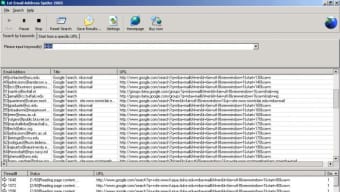
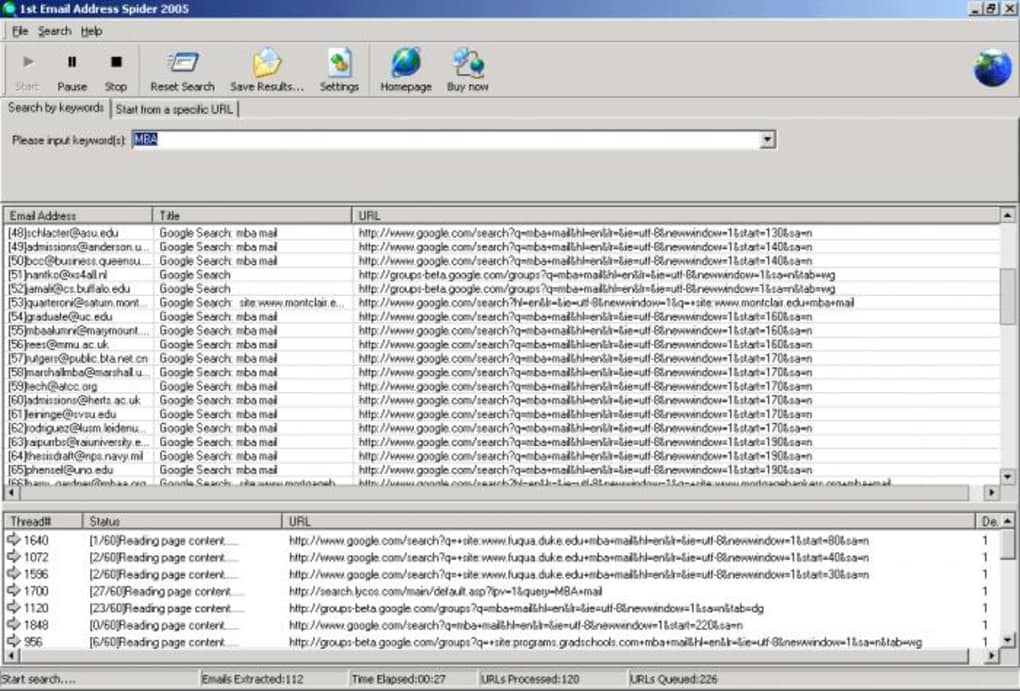
After installation, launch the application from the desktop shortcut or the Start menu. The main interface presents three primary panes: a search configuration panel on the left, a live results window in the center, and a status bar at the bottom. To start a search, enter your target keywords (e.g., “marketing,” “university”) and specify any domain or country filters you wish to apply. You can also adjust the crawl depth—the number of link levels the spider will follow—from the default of three levels up to ten for more exhaustive searches. Once configured, click the “Start Spider” button. The tool will begin scanning web pages, extracting email addresses, and populating the results window in real time. You can pause or stop the crawl at any moment using the control buttons, which is useful if you need to refine your filters on the fly.
Compatibility-wise, 1st Email Address Spider 2006 is officially supported on Windows 98, Windows ME, Windows 2000, and Windows XP. Because it relies on legacy system libraries, it may not run natively on Windows 10 or Windows 11 without compatibility mode, though many users report success by setting the executable’s compatibility properties to “Windows XP (Service Pack 3).” The software runs in 32‑bit mode and does not require a 64‑bit environment, making it an ideal candidate for older corporate desktops or refurbished machines. The program is available in English only, but the intuitive layout means language barriers are minimal.
For those who prefer command‑line automation, the application offers a set of hidden switches that can be invoked via spider2006.exe /search "keyword" /domain "example.com" /output "C:\emails.csv". This enables batch processing and integration with scheduled tasks, allowing you to run periodic email harvests without manual intervention. Security considerations are also addressed: the trial version does not transmit collected data to external servers unless you manually choose to upload, ensuring that your harvested lists remain under your control. Regular updates (the last one released on 29 June 2006) included bug fixes for URL parsing and improved proxy handling, though no further updates have been announced. Nevertheless, the stable core functionality remains reliable for its intended purpose.
Pros & Cons, Frequently Asked Questions
Pros
- Extremely lightweight – runs smoothly on legacy Windows systems.
- Focused feature set eliminates unnecessary bloat.
- Powerful search filters for domain, keyword, and country.
- Built‑in duplicate removal saves post‑processing time.
- Proxy support enhances anonymity during large crawls.
- Multiple export formats simplify data migration.
- Free trial provides full access to core functionalities.
Cons
- No native support for Windows 10/11 without compatibility mode.
- Interface looks dated compared with modern SaaS tools.
- Limited to English language; no localization.
- Updates ceased after 2006, so newer web technologies may be missed.
- Lacks built‑in email validation (only duplicate removal).
FAQ – Your Questions Answered
Is 1st Email Address Spider 2006 safe to use for bulk email harvesting?
Yes. The program runs locally on your computer and does not transmit harvested addresses unless you manually export them. It respects privacy by keeping all data on your device, and the trial version includes no hidden telemetry.
Can I run the spider on modern Windows 10 or 11?
While the software was built for Windows 98‑XP, you can run it on Windows 10/11 by setting the executable’s compatibility mode to “Windows XP (Service Pack 3).” This usually resolves any DLL or API issues.
What is the difference between the free trial and the full version?
The trial version provides unlimited searches and full access to all features for a limited time (usually 30 days). The full version removes the time restriction and may include priority support, but the core functionality remains the same.
How does the duplicate‑removal feature work?
As each email address is captured, the program checks it against an internal hash table of already‑found addresses. If a match is found, the new entry is discarded, ensuring the final list contains only unique contacts.
Can I automate searches using command‑line parameters?
Yes. Advanced users can invoke the executable with switches such as /search, /domain, and /output to run headless crawls, which can be scheduled via Windows Task Scheduler.
Conclusion & Call to Action
1st Email Address Spider 2006 remains a solid, no‑frills solution for anyone who needs to gather large volumes of email addresses from the public web without investing in expensive cloud‑based services. Its lightweight design, powerful filtering options, and straightforward export capabilities make it especially attractive for users operating on legacy Windows machines or in regions where bandwidth is limited. While the lack of recent updates and a modern UI may turn off some power users, the core functionality—fast crawling, duplicate removal, and proxy support—still delivers tangible value for targeted lead generation, academic research, or recruitment outreach. If you’re looking for a free, secure, and easy‑to‑install bulk email search tool that works on Windows 98‑XP, the trial version of 1st Email Address Spider 2006 is worth downloading today. Install it, run a test crawl, and see how quickly you can build a qualified mailing list. For businesses that require ongoing harvesting, consider purchasing the full license to unlock unlimited use and receive priority support.
Ready to boost your email outreach? USD 0.00 – Download the free trial now and experience the speed and simplicity of 1st Email Address Spider 2006 for yourself.
Pros: Lightweight, powerful filters, proxy support, duplicate removal, free trial.
Cons: Dated UI, no native Windows 10/11 support, no built‑in email validation.
Guides & Tutorials for 1st Email Address Spider 2006
How to install 1st Email Address Spider 2006
- Click the Preview / Download button above.
- Once redirected, accept the terms and click Install.
- Wait for the 1st Email Address Spider 2006 download to finish on your device.
How to use 1st Email Address Spider 2006
This software is primarily used for its core features described above. Open the app after installation to explore its capabilities.
User Reviews for 1st Email Address Spider 2006 0
No reviews found





